Jan 2, 2013

Install Unsigned Application using "NORTON SYMBIAN HACK"

Files To Download:

1. NortonSymbianHack.sisx     -      http://www.mediafire.com/?714ohv5x2hyew62 
2. RomPatcherPlus_3.1.sisx     -      http://www.mediafire.com/?7y6mmc10zx2ap61

PROCEDURE:

STEP1: 

             Install “NortonSymbianHack.sisx” and Launch it. 


STEP2:

            1. Select or Click on "AntiVirus" it shows some option on that 
            2.Select "Quarantine list"

 STEP3:

           On Quarantine list there will be three files that makes the synbian not to check for certificate, then select "OPTIONS". Some options will be displayed as shown below on that Select "Restore all".


STEP4:

            Now you can exit and uninstall "NortonSymbianHack".

STEP5:

           Install “"RomPatcherPlus_3.1.sisx”" 

STEP6: 

             Lanch the application,then select "OPTIONS"----> some options will be displayed on that select "All Patches" and click "Apply".


 That's it now you can install all unsigned applications on your Symbian phone...........

Happy install..........

Dec 16, 2012

Nokia C5-03 RM-697 v23.0.015(updated) Symbian^Belle Lite v4.1 CFW


Nokia C5-03 RM-697 v23.0.015 Symbian^Belle Lite v4.1(updated)

(Same as Symbian lite v4.0 --UPDATED--Maximum BUG Fixed for Smooth Running)


FEATURES:


  • Bugless Symbian^Anna Icons
  • Enhanced data rate and RAM transfer speed mod
  • Prehacked with Super Installserver. You can now install everything without the need for signing and no more package built in errors.
  • RAM Cache and Speed Optimized (Note: This RAM optimization is only exclusive for C5-03)
  • Read Music files from E:/Music/
  • CPU Acceleration Mod (Speed and Battery Optimized).
  • RAM and Memory friendly Myra Fonts (Kinda small but a pleasure eye candy)
  • Java Permissions Mod
  • Symbian^3 Extended Menu
  • CPU clock optimization mod.
  • Restart option in Power Menu
  • Integrated Symbian Black theme 
  • Browser Cache Optimized

DOWNLOAD LINKS:


FLASHING TUTORIAL: "CLICK HERE"


HAPPY FLASHING............
  

Nokia C5-03 EXCELLENT MOD V.2.0(BELLE REMIX)


Nokia C5-03 EXCELLENT MOD V.2.0(BELLE REMIX)


INTEGRATED APPLICATIONS:

• RomPatcher + 3.1
• Conversations
• MemCheck
• Kill Me
• ZIP
• Autoinstaller
• In the folder E\ThinkChange\E such programs:
- Opera Mini Next
- DzMuiscKey
• domainRp


REMOVED APPLICATIONS :

• Help Files + click "Help" in all applications
• Standard Themes
• Chat
• Voice commands
• Adobe Reader
• Quick Office
• Welcome (greeting when you first start)
• Music OVI
• Synchronization OVI
• OVI Store
• Search
• Share the Internet
• About
• Settings accessories
• OVI Contacts
• Video sharing
• Podcasts
• Shazam
• Disabled DRM


VISUAL CHANGES:

• Change Font
• Replaced the effects of those
• Added themes Black UT, Blossom, Blue Bird, Rock and Stars
• Changed the menu hierarchy
• RomPatcher + has a new icons
• Changed the icon of the "key" to "lock" in Tap to unlock
• QWERTY 11x4
• Added a mini QWERTY
• Change the configuration of the kinetics
• Replace the "handle" on the other animations
• Add a contact picture by default if it is not worth Photo
• Reduce the top menu bar
• Swap button switch keyboards and close to the alphanumeric keypad
• Meego Mix Iconpack
• Codecs N8
• Equalizer N8


SYSTEM CHANGES :

• Integrated hacking - InstallServer.exe
• Now presentedin ROFS1, ROFS2, ROFS3
• Faster launch phone
• Nokia Browser updated to version 7.3.1.33
• Remove items "Go to Music store. Shop" and "Find in Music store. Shops" in Moose. Music player.
• Removed some startup processes
• Removed the restriction transfer SIS through a standard VAR. files
• Camera sounds are replaced by the sounds of Belle
• Disable Caching of some programs
• Added icons modes
• Characters are replaced with English layout
• Removed reserve FOTA
• Disabled greeting when you first start
• Disabled SMS sent when you first start
• Number of saved msgs. 999 posts
• Extended right for JAVA applications and SIS
• Change the size of HEAP and delay closing applications
• Edit ScriptInit
• Increase the size of the cache and disk cache moved to drive E
• Change the location of the cache folder browser - now the cache to disk E
• Change the threshold memory
• Change the setting of performance
• The player scans E \ Music
• Change the system cache
• Flickering light indicator is turned on by default
• When you first start off request the date and region
• Gallery scans images from specified folders
• Improved sensitivity Wi-Fi


DEFAULT SETTINGS :


• Enable screen rotation by default
• Change the phone auto-lock time
• Now shows call duration
• The volume of the headphones and accessories during a conversation 10
• time-out 15 seconds
• Keyboard by default - Alphanumeric
• Change the default browser
• Turn on the resume broken downloads in the browser
• Change the hierarchy of messages


PATCHES THAT ARE IN THE FIRMWARE :


  • c2z
  • Center Text
  • Install Server RP
  • Mega Bass Effects
  • ModKeyboard
  • NoBuiltinError
  • Open4All RP
  • TopBarPatch
  • Small Softkeys on Landscape


DOWNLOAD LINK:


FLASHING TUTORIAL :   "CLICK HERE"


HAPPY FLASHING.............


Signing Symbian products using SISContents


                                           There are many products in Symbian are Unsigned due to this our Nokia smart phones will not install Unsigned Products until we hack it.Below tutorial will explain to Signing a product.

PROCETURES:


Step1:  Download "SISContents"----->"Click Here"
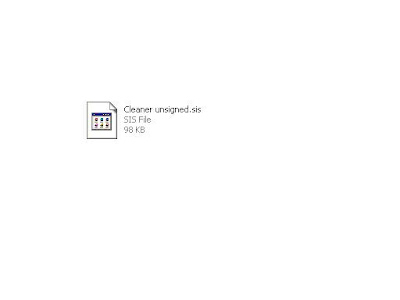
Step2: Download Unsigned Products.... (I take mobile cleaner as an example)
  
Step3: "Open" SISContents which is downloaded on above link


 Step4: "Open the Product" to be Signed....


Step5:  It shows the "product Information" Which Is Not Signed


Step6: Click on "Sign" button on tool bar.


Step 7: Click on "Key Pairs" Tab to Start Signing the Product.


Step 8: SISContents already contains its own signature file- we are going to add SISContents signature to our product.

        1. Select the "Profile Name" that SISContens already has.
        2.All Signature files will "Automatically generated".
        3.We can give our own Signature "product name".
        4.Click "Apply" to add signature.

Step 9:  Now Switch to "Packages" Tab then Select the "Signature profiles" we created...


Step 10: Now adding signature.....
         
        1.Click "Add Signature" button.
        2. Now it will add signature to the product as shown below.
        3.After adding signature close the "Sign package" tab.

 Step 11: Now see Signature get added to our Product......


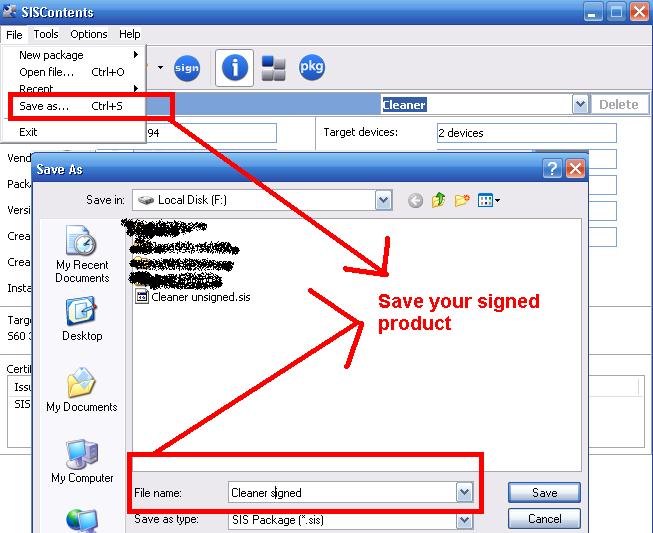
Step 12: Now "Save" your Signed Product.........


Thankyou Happy Signing.......

Nov 12, 2012

Nokia C6-00 (RM-612) and (RM-624) ToPaZ v.3 (Belle & Non-Belle versions)


NEW FEATURES:

Exclusive Modification:
 
- Pure QT integrated into cfw. [No conflicts with other applications]
- New Installserver by me. [No bugs whatsoever in installing Qt apps or Nokia drop]
- Python integrated in the cfw. [Run python apps from both drives]
- Myra Pro Fonts [Bold Support]
- Mixed icon pack. [Complete with colourful submenu icons and mailbox icon fixed]
- Working ovi maps after flash. [Updatable]
- Startup animation and sound after flash and also customizable.
- Completely new and bugless belle navigation bar. 

Performance
 
-Smooth User Interface for heavy loading.
-Fast, Quick and Stable performance. [Even when the ram is low]
-Personally edited the starter files.[None of the necessary apps have been disabled]
-System cache moved to C:
-Frames rate per second improved
-Good battery life.
-Very fast Screen Rotation.
 

General Modifications
 
- Extra Sensor settings - Tapping controls Added.
- Java Permissions completely Removed.
- Widgets Security is now Disabled. 
- Ovi Contacts Completely removed and Disabled.
- Tap to Unlock with working Notifications.
- Press and Hold '0' to Switch ON Bluetooth.
- No scrollbar in menu.
 

Visuals
 
- S^3 automatic transparent effect for widgets.
- Symbian belle theme effects [With original symbian belle loader and new rotation effect].
- New mixed icon pack. [Exclusive]
- Default theme is symbian belle. [All original and previous themes included] 
- Belle Navigation Bar [Like original belle without bugs]
- Belle Symbols on HS.
- Lock icon added to Tap to Unlock.
- New battery icon.
- New network icon.
- Better user friendly viewing of web feeds from the browser. [Check the screenshot]
- Fading effect is back during pop-up.
 

Camera [With Belle Bar]
 
- Video Quality set to maximum
- Video Stabilization
- Already In Use Bug Fixed
- Camera Touch Capture Button fixed
- Picture quality set to 100%.
 

Browser
 
- Web cache moved to E:
- Web cache highly increased.
- Browser version 7.3.1.33 [All bugs removed in navigation bar]
- Default homepage changed to www.insta7.com
- Default font size set to large.
 

Messaging
 
- More pages of characters in the Symbols page. Press star in messaging to see.
- Removed Messaging lag completely!
- Added Conversation to Messaging
- New mailbox icon in messeging.
 

Clock 
 
- Digital Clock set as default.
- Clock is now 12 Hour format.
- Date is DD-MM-YYYY format.
- N9 clock fonts.
 

Keyboard
 
- Mini Qwerty Completely removed with no red key bug and light sensor preserved.
- Alphanumeric Keyboard Layout Changed.
- N8 Qwerty Layout.
- Autorotate to qwerty in landscape.
 

Lights behaviour
 
- New light mod. [Optimized for C6-00]
- All bugs related to keypad locking removed.
- Breathing light off by default.
- Auto-Keyguard adjustment option added to Settings.
- Tap to unlock supports autorotate.
- Default light timeout set to 30 seconds.
 

Music
 
- Put all your songs in E: music. [It will also read from music subfolders]
- Equalizer by vova1609 [Full screen and one tap change equalizer]
- Music player fix. [Stops opening of menu when you exit from widget]
- Nokia 808 Pureview Codecs used.
 

Personalization
 
- Ability to rename any application within the menu by going to options organize and renaming it.
- You can now have two startup boot screens and a shutdown screen. [Volume tone also increased for them]
- Keep Startup.gif, Startup2.gif and Shutdown.gif in E:\Boot
- Nokia black splash screens added. [Like belle]
- Boot folder would be hidden from gallery.
- ToPaZ folder also hidden from gallery.
 

Miscellaneous
 
- Send protected items via default file manager.
- Necessary process will be automatically moved to kill me protected list after flash.
- Custom menu & homescreen arrangement.
- Swipe screen to clear the screen
- 5 additional shorcut bars on HS
- Removed centred text in potriat mode.
- Gallery delete button 
- Reserved 5mb space on c after flash
- Added option to configure autolock time
 

Integrated Applications
 
- Rompatcher plus 3.1
- Brightlight
- Memcheck
- Kill me
- Uninstallking
 

Applications installed after flash
 
- X-plore [Anna Icon]
- Photobook [Anna Icon]
- Powerboot [Anna Icon
- Screensnap [Anna Icon]
- Google Maps [Anna Icon]
 

Applications Removed
 
- Quickoffice
- Adobe Reader
- File Browser
- Welcome
- My Nokia


IMPORTANT INSTRUCTION:


    -Make sure that you use the provided Core , Rofs2 and Uda only


    - Do not mix them with the original one or you may brick your phone.

    - Also do not use any extra original files for flashing like Rofs3. Just use what is provided and nothing else.

    - Do not make changes to starter non critical.rsc, if you want to make then make sure MiniCMD.exe is always enabled.

    - Keep your memory card intact while flashing.

    - After you flash your phone with all the provided files, your phone will be automatically hard resetted after flash, so no need to hard reset again.

    - After the phone starts up just punch in your details and when you reach homescreen just wait for 1 minute or more before touching as it will perform some necessary process in the background.


DOWNLOAD LINK:


NOKIA C6-00 RM-612(42.0.004):

Core  -"CLICK HERE "[Do not use any other core for flashing with this cfw or else you may brick your phone]

Belle Navigation Bar Version  - "CLICK HERE "

Non Belle Version  - "CLICK HERE "


NOKIA C6-00 RM-624(42.0.004):


Core By Me-"CLICK HERE"
[Do not use any other core for flashing with this cfw or else you may brick your phone & thanks to vizhigal & vgp]

Belle Navigation Bar Version-"CLICK HERE"

EXTRA DOWNLOADS:


[If you want 4 row qwerty then put this in Rofs2 and repack and reflash]

[Move browser cache to C: if you are not having memory card]

[To remove E:/Music/ mod put this in Rofs2 and repack and reflash]

[Theme which can be used for belle top bar with no indicators]

[Belle topbar v2.1 Beta R2 by Measma]