Jun 14, 2013

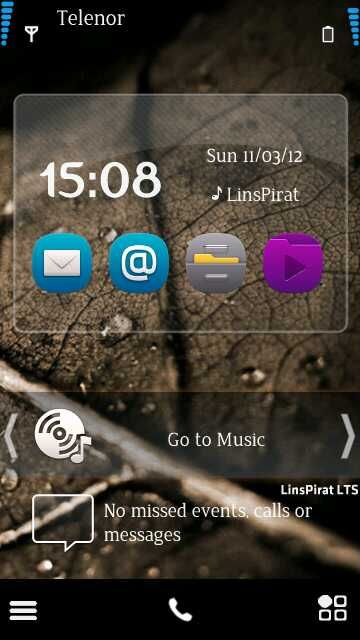
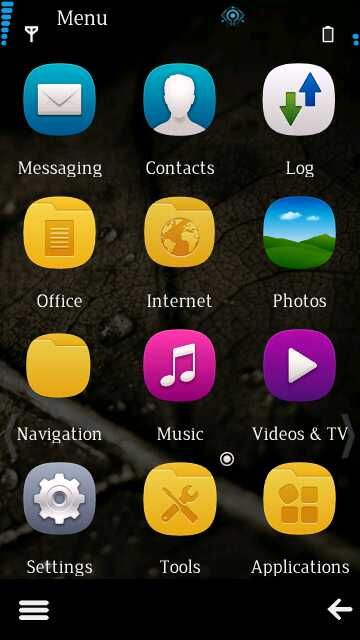
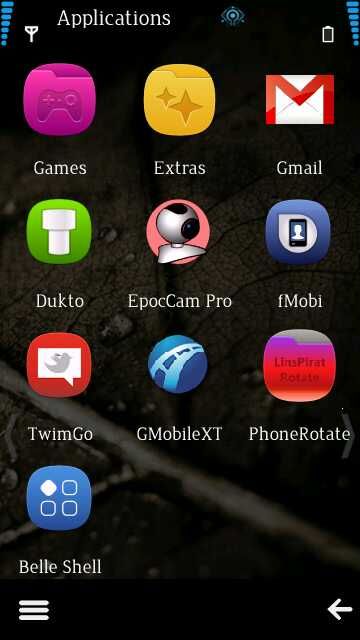
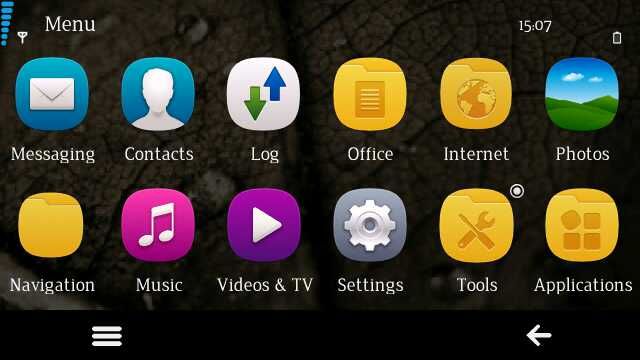
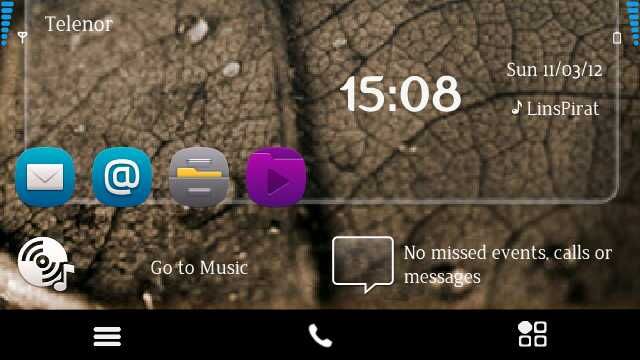
LinsPirat LTS rev2.1 FOR Nokia 5233(RM-625)-5230(RM-588)-5800(RM-356)(RM-428)-5530(RM-504)-X6(RM-559)

SOURCE URL: 


 http://forum.dailymobile.net/index.php?topic=59796.0


CFW CREATOR: 


tintinboss


FROM CREATOR: 


                                   28th March, 2012  - Linspirat rev 2.1 released for 5800 & 5530.. 

-- Huge Performance Upgrade
-- QT Integrated
-- LinsPirat Music Theme Reworked
-- LinsPirat Plus Pack added with download. Contains All previous LinsPirat Themes and           Wallpapers + Working latest Ovi Store
-- New Never seen before Sparkling swipe to answer and new Swipe to Unlock
-- Camera Hardware key fixed
-- Smoother KS


First of all...
I would like to say that this cfw is simply awesme n best cfw i've used ever.. 

If you are a graphics freak n love your phone to look pretty, then this cfw is what you need..


Quote from tintinboss :


Quote
So, here it is, I want to share you "what I had in mind while developing this" :
"LinsPirat LTS" is unlike "LinsPirat v1.0" - a more professional and sober looking OS. You can say - a fat-less LinsPirat  . I tried to achieve a state where you feel different using your very known Nokia Device. Don't know if I failed or achieved tiny bit of success.

As with LinsPirat v1.0 Designed by me all the way (Surely grabbing ideas from here and there and combining my tastes). Own resources and vector arts. With LinsPirat LTS feel a more sophisticated and eye friendly UI.


SCREENSHOTS:


FEATURES:


-- Fast and colorful (60mb+ ram at start up , loads of color in LinsPirat theme).

-- NEW! LinsPirat LTS (Music) Theme!

-- NEW! LinsPirat LTS (Music) Walls.

-- NEW! LinsPirat LTS theme.

-- NEW! 5 LinsPirat Ringers (Personally edited from fav tunes).

-- LinsPirat v1 theme Revamped (will be available for autoinstaller).

-- New! 6+2 LinsPirat HD walls.

-- Music Player Supporting Karaoke with any .lrc (15.2 default).

-- NEW! -- Windows Phone 7 Giant font minified by me! (Have a plan to release giant version in future.) 

--  New and reworked ANIMATED LinsPirat LTS bootscreen (mbm file for smooth animation).

-- LinsPirat v1 Theme included - (colorful and with anna pop icons)

--5 Extra equalizer presets.

-- Glossy swipe to unlock.

-- Common good apps cooked within CFW.

-- Rompatcher with proven patches.

-- Personal Server Links.

--Effects : Android Theme effects by nhelske.


CREDITS:


  1. PNHT Team, 
  2. Die2mrw007, 
  3. binh24,
  4. Tristar2,
  5. Mayank (For his fabulous WP7 theme! (Edited by me to suit my CFW))
  6. Xtreme.Infinity,
  7. Ivcha90,
  8. mara ,
  9. CODeRUS, 
  10. dan-av , 
  11. Szakalit ,
  12. Doctorly,
  13. Jhaorosario,
  14. vova,
  15. nhelske,
  16. Newcooller,
  17. Rawand Kurdy,
  18. chris_marsh, 
  19. Saminder (For reporting issues and helping in the solving process too!)
  20. Neutron v12 team (Abhitheracer and Gaurav619) for the mediabar (I edited using Newcooller's mediabar editor tool ).


SPECIAL THANKS TO Xtreme.Infinity for doing fabulous job and hardwork in Porting the CFW to other RMs! Thanks my little brother 

A BIG THANKS TO Tristar2 for Porting the CFW RM559 and testing it too! You are always special to have in the LinsPirat Projects! A reliable arrow in the arsenal to say the least!  

Thanks to Parasavaitor for not only beta testing, but analyzing like a professional and suggesting a lot of things  Thanks bro 

A BIG THANKS TO Ivcha90  for Porting LinsPirat LTS Rev2 to other variants  

Thanks to Aki07 for his hard work in making LinsPirat LTS Special Edition using N97v30 as base!!! Really gr8 bro! Thumbs up!

Raman (for helping with V60 core version of RM356)

and all good modder friends....


ABOUT MEDIABAR:


                                    The accel swith icon is not for accel switch. Rather it will rotate your screen permanently until you press that again ( WORKS ONLY WHEN SENSOR IS OFF - LOGICAL right?). 
We actually need that kinda rotation while browsing the web (lying on bed ) or reading a PDF.
HOWEVER - Accel switch is integrated.


INSTALLATION NOTES:


If you hard reset or factory set your device, please flash again to get the 5 new equalizer preset.

--Use provided UDA (Otherwise you wont get 5 equalizer presets).
--Use v50 core for RM-625 by binh24
--Format memory card from within phone before you give it a go.
--Restart device after 

DOWNLOAD LINK:


1) Nokia 5233 RM625 -----> "DOWNLOAD"

2) Nokia 5230 RM588 -----> "DOWNLOAD"

3) Nokia 5800 RM356 -----> "DOWNLOAD"

4) Nokia 5800 RM428 -----> "DOWNLOAD"

5) Nokia 5530 RM504 -----> "DOWNLOAD"

6) Nokia X6 RM559 c6v41 ------> "DOWNLOAD"

7) Nokia X6 RM559 n97v30 -----> "DOWNLOAD" 
          (LinsPirat LTS SPECIAL EDITION (N97 PORT )  BY Aki07)

Password---------->  tintinboss2012


HAPPY FLASHING...........

May 23, 2013

Bazaraa CFW For Nokia C6 (RM-612)(v 42.0.004) & N97 mini (RM-612)(v 30.0.004)

ORIGINAL SOURCE OF THIS CFW:

http://forum.dailymobile.net/index.php?topic=76644.0

CREATED BY:


FROM THE CREATOR:

 I had finally port Bazaraa CFW v IV to C6 RM-612 & N97 mini RM-612 which considered the best for both phones till now, I have successfully port it without having the phones and they works without bugs.
The CFW has been based on the latest version for both phones means v 42.0.004 for C6 and v 30.0.004 for N97 mini..

SCREENSHOTS:


FEATURES IN THIS CFW:


01- The languages supported by this CFW:-

01- English (default language)
02- French
03- Arabic

Note: these languages are for the menu and for reading & writing and also languages for the dictionary


02- The applications added in this CFW:-

01- An amazing theme called Nokia Belle (edited by me)
02- An amazing theme called Nokia Water (edited by me)
03- Nokia Maps v 3.06.637
04- Conversations (hidden from menu but I have left a shortcut in the messages list)
05- ROM Patcher Plus v 3.01 (with Anna style from inside)
06- Bluetooth Switch
07- Easy Key Lock
08- Bright Light v 1.0
09- Timer v 1.25
10- Best Screen Snap v 3.01
11- Bounce Touch
12- Global Race
13- Notifications widget
14- Three new shortcut widgets in the home screen (edited by me to support the three languages)
15- JAVA has been updated to v 1.4.48

03- The applications removed from the CFW:-

01- All original themes
02- Boingo
03- JoikuSpot
04- Qik
05- Vlingo
06- Music Store
07- Download!
08- Chat
09- Operator Menu
10- Here & Now (from N97 mini v 30)
11- The free space in the C is more than ## MB after formatting (I want the help from the phone's users)

04- The patches added to the ROM Patcher:-

01- c2z
02- Install Server RP+ (active)
03- Lock Internet (active)
04- No Built-In Errors
05- Open4All RP+ (active)
06- Remove Red LED

05- Networks modifications:-

01- Some useful bookmarks are added
02- The FOTA has been removed to free up about 5 MB
03- The WI-FI has been improved
04- The latest Nokia Internet Browser v 7.3.1.33 has been added
05- The latest Nokia Store app. v 1.24.9 has been added and it will automatically installed when you press on its icon
06- Nokia E-mail app. has been added

06- Media modifications:-

01- The camera sound will be silent whenever you make your phone silent
02- Symbian^3 equalizer has been added
03- The camera zoom has been duplicated
04- Gallery mod has been added to replace Share Online button with delete and slide show (support the three languages)
05- The camera quality has been improved (images & videos)
06- The recorder has been improved
07- The time of the recording has been increased from 1 hour to 12 hours
08- The new version of the Music Player v 15.2 has been added (the problem of opening menu while exiting the music has been fixed)
09- The sound strength & quality have been improved and become stereo
10- The searching in the music player has been quicker (reads only from E:\Sounds)
11- The searching in the studio has been quicker (reads only from Images & Videos)

07- Settings modifications:-

01- A new arrangement for the menu (edited by me)
02- A new arrangement for the widgets in the home screen (edited by me)
03- The effects are off by default
04- The patches automatically moved to E:\Patches
05- The Bluetooth name is Omar Wael by default
06- Nokia Belle theme is the default theme
07- Nokia tune new generation is the default tone
08- The clock is digital by default
09- The light time-out is 30 seconds by default
10- The brightness has been set to 100%
11- The sound degree has been set to 60% in the music player
12- The number of saved sent messages is 999 by default
13- Show call duration has been set to yes by default
14- The sound degree has been set to the highest degree during calling
15- The right soft key has been changed to Menu
16- The Auto rotate is active by default

08- Phone speed modifications:-

01- The background apps. has been closed
02- The camera don't stay more in the background after exiting it
03- All the start up apps. have been closed
04- The cache has been improve to speed up the phone 
05- The rotation sensitivity has been improved by a normal mod to feel the balance of the phone
06- The effects have been speeded up
07- Opening & exiting apps. have been speeded up
08- The scrolling has been improved to simulate Nokia Belle (edited by me to become unlimited)
09- The phone all over has been speeded up
10- The phone start up has been speeded up
11- The automatic installation of Nokia Store has been disabled
12- The start up animation & tone have been removed to speed up the starting of the phone
13- The RAM has been about ## MB after starting the phone and about ## MB after the usage (I want the help from the phone's users)

09- Style modifications:-

01- New effects are added and they look like the effects of Nokia Belle
02- I have added all Nokia 701 v 112 ringtones + Nokia tune new generation from the store
03- A new stylish font called Comfortaa has been added (edited by me to support Belle symbols)
04- The new style for Favourite Contact widget has been added .. now it looks like Symbian^3 widget
05- Swipe to unlock has been added (edited by me to support the three languages and to to work in the landscape mode)
06- Symbian Anna icons have been added and it support the three languages without bugs
07- Symbian^3 Landscape mod has been added
08- Center Text mod has been added
09- Extended Menu mod has been added
10- I have exchanged Done button with Change the Method of Typing button in the keypad
11- N8 smiley has been added
12- I have added 6 pages of symbols (edited & chosen by me)
13- I have added full & mini keyboards
14- Belle navigation keys have been added but support English only (edited by me)
15- I have added logos beside Shutdown & Restart button (edited by me & supports the three language)
16- I have changed the start up & shutdown screen by a new screen looks like Belle screen
17- The new dialer has been added

10- System modifications:-

01- The phone has been hacked by the ROM Patcher
02- The battery life time has been increased
03- The touch screen has been improved and becomes more sensitivity
04- The log now saves till 365 days (supports the three languages)
05- The memory card logo will appear if you inserted one
06- Now you can backup your files in the mass memory directly
07- I have removed Music Player shortcut from the music list
08- The rotation during calling has been disabled
09- The vibration during lock or unlock has been disabled
10- Nokia first start up message has been removed
11- I don't make the profile widget removable
12- I have added restart feature instead of lock phone feature
13- Now you can re-light the screen by only one touch
14- Now you can send the applications from the file manager directly
15- The protected files in the file manager have been visible
16- I have shown some hidden apps. and hide the other in the menu (edited by me)
17- I have change some information about the phone (please don't change it)
18- Adobe PDF & Quick Office have been activated
19- I haven't changed the general profile name to feel the original software
20- When you open the keypad and rotate the screen it will automatically change to the full keyboard and vice versa
21- The light strength has been improved
22- Now there are more than 35 brightness degrees instead of 5
23- There will be vibration when starting or ending a call

The bugs that have been fixed:

01- The QT problem has been fixed
02- The Voice Commands app. has been fixed
03- Install & uninstall problems have been fixed
04- The patches activation problem has been fixed and they will automatically become active after restarting the phone (fixed by me)
05- The mess in the video player icons have been fixed
06- The problem of the music player that opens the menu while exiting any music has been fixed

Note: please use the phone in English to get all the features.

Flashing guides:

Before flashing with JAF you must delete the following folders ..
data, private, resource, sys, system and finally patches from the mass memory

That's very important to avoid getting bugs:


We will need the JAF and I have uploaded it on Google Drive


WinRAR password: omar_bazaraa

Installing JAF correctly on the computer:

At the beginning install "JAFSetup_1.98.62" then install "JAF_files_update" and accept replacement, thus we have installed JAF correctly.

Some problems with the solutions:


STEP1: If you are from Windows 7 users then you must do the following to avoid problems. Open the properties of "OGM_JAF_PKEY_Emulator_v 5" then do like the following picture


STEP2: After that open the same file "OGM_JAF_PKEY_Emulator_v 5" and press GO this message will appear .. 


STEP3: Don't consider it error but press OK and the JAF will run correctly.

Some Notes:


To make the JAF work without problems and to recognize your phone quickly we must install Nokia Suite and left the computer to recognize the phone through it,
and we can download the latest version from Nokia Suite---> http://nds1.nokia.com/files/support/global/phones/software/Nokia_Suite_webinstaller_ALL.exe

Now we must move folder "RM-612" (or "RM-555" according to your phone) to "C:\Program Files\Nokia\Phoenix\Products" after deleting all files from it,and if we don't find that path we must create it manually.

Before flashing we must do the following ..
1) switch the phone off
2) remove the battery from it
3) don't connect it with the USB yet

Now we will go to the video that explains every thing:


Note: CNT button will not be active and that's normal, so go on and continue flashing..


After flashing the phone please format the phone memory
and the following picture will make it clear


After switching off the phone
press on these buttons and don't leave them until the screen lights
__________________________

At the end I hope that you like my CFW
and I am waiting your replies and suggestions to the next version
and please hit the green arrow because I have been modding this CFW for more than 2 months
and also I have been writing this topic for more than 3 hours
hitting the green arrow and your reply will not take a minute

I don't allow anyone to paste this topic anywhere without writing the source
and also I don't allow to change the download links

Goodbye

DOWNLOAD LINK:  "NEW LINKS: 24-01-2013"


1) For C6 RM-612--------> Bazaraa CFW v IV for C6 RM-612

2) For N97 mini RM-555------> Bazaraa CFW v IV for N97 mini RM-555

WinRAR password:  omar_bazaraa


HAPPY FLASHING.......

May 6, 2013

Nokia C5-03,C5-05,C5-06 DM FINAL PRO AND MOD_tres


SCREENSHOTS:


From creator:

                    I would like to credit and give thanks to the following person in my FB GROUP
for sharing their wonderfull knowledge and contributions in belle-clock,Topbarbar,
and navi-bars:

1. Ramzkie
2. Zetzu
3. JFmark
4. Algie
5. Jhong
6. Christopher
7. to whom i missed (if ever xD)


i would like to give a special credit to tol Nivram for sharing his khnowledge in
watermark, boot animation and shutdown animation. Two Thumbs up for you 


*Special thanks to the following for helping me test and fixed tres:

1. Jandinar
2. Nico
3. Nivram

* Special thanks also to Jeck-jeck for his ideas in "fixing light bug"

CHANGELOGS FOR PRO|MOD_TRES C5-0X:


1. Navibar almost perfected with new symbols
2. press power key will now directly direct you belle refresh power menu
3. belle refresh power menu now have new symbols
4. added new sets of skins for belle clock
5. graphics ui now set to FASTEST
6. No. "Untrsted SW vendors" pop-up while installing
7. Added new mod for better voice recognition
8. Voice recognition is now set to max sensitivity
9. added LOTS of Topbar skin that you'll surely love it
10. equalizer now full working 
11. added nokia 808 codec
12. new boot animation
13. new shutdwon animation
14. new boot images and tone
15. new shutdown image and tone
16. new font with new symbols
17. new sets of themes
18. modded themes to support topbars and now have semi ans full transparent widgets bg
19. menubar is now new and i called it "ics_upsidedown" xD
20. now the ui have now better transition 
21. NOW LANDSCAPE IS WORKING WITH MENUBAR
22. i forgot lots of it so its for you to find out guyzzzz hahaha! xD

CHANGELOGS FOR v2.4:

1. green light charging rectified by me (for 356 only)
2. gallery junk fix by me
3. busy circle mod change by me
4. pop up sliding txt changed by me
5. startup animation changed by me
6. start up image changed by me
7. change font to benguiat font modded by me
8. change default mpc (thanks to tol zetzu for base)
9. added asha gray btb skin modded by me
10. added belle yellow btb skin modded by (pareng tol) JfMark
11. added enma gray full transpa btb skin by manong Ramzkie Panget
12. added red android btb skin by manong Ramzkie
13. added silip droid v2 and v3 (thanks to lolo Julz and mR. K)
14. default btb skin babttery is changed by me
15. shutdown image change by me
16. shutdown animation change by me
17. smileys bug now fixed by me
18. now running with GLOSSY ANNA ICON PACK my idol JUSFER(RM-625/356/588 ONLY)
19. UI smoother than before
20. added some themes
21. some i forgot
22. rectified the version bug
23. lock icon on menubar by bro Jhong Martinez
24. NOW SUPPORT TRANSPARENT BTB SKIN
25. new watermark by manong Nivram Ollicnerem
26. discover other changelog i forgot hehehe 

NEW ADDED FEATURES:

  • fix topbar bug- now coming with 11skins (by dropping my mod) thanks to tol Macky for some skins
  • fix menubars bug - now comming with RED Lumia wp8 skin(by dropping my mod) - thanks to toll Macky Magbanua for the tutorial
  • new Beats deskclcok skin by me
  • the new theme is now the default one
  • new splash screen in z:/ for fast boot by me
  • new startup animation in z:/ for fast boot thanks to original mod owner
  • new startup sound in z:/ for fast boot
  • some tweaks to make is smooter, RAm friendly and more efficient in battery
  • new fonts 
  • calculator from nokia is back
  • ovi store is only accesible via default internet browser 
  • NOT AUTO START UP "TB, MB and desclock"

WHAT TO DO BEFORE FLASHING:


1. FORMAT C:/ BY *#7370#
2. delete the folllowing folder of memory card
     a. data
     b  private
     c. resource
     d. sys
      e. system
3. a)DOWNLOAD NEVAR27 and extract it in memory card (e:/nevar27/boot)
    b)download LIVE HS and extract it in E:/
        [/b][/center]
    c)transfer the FOLDERS and APPS in mmc
4. Download the THINKCHANGE then extract it to your memorycard
5. transfer all your mp3 files to E:/PROMOD_MUSIC/
6. now your ready to flash


HOW USE TRES ON FIRST BOOT UP:


PART-A:

1. reboot your device 2TIMES (must to have smooth transition)
2. install python 
3. run auto installer or manually intall the apps in thinkchange folder
4. reboot and resume normal usage of device. atlast feedback

PART-B:

1.  change hs to ORATSu
2. goto rompatcher turn on the patches 3in1, open4all rp+ and no statusbar
3. make your own e2z
4. drop e2z to c:/patches
5. goto rompatcher
6. turn on e2z
7. open xplore/mark the data,resource,private,sys,system from folder "BTB-MB for C5-0x by           nevar27"
8. COPY and drop to c:/
9. download SETTING and drop to c:/Belle_TopBar/
10. run topbar (DONT EVER EVER CHANGE ANY SETTINGS EXCEPT SKINS)
11. Run menubar
12. enjoy!!

V2 CHANGE LOG:


- touch sense is now better
- writing speed is now better
- Belle refresh power menu mod with symbols is added shared by uropb*
- mini qwerty keypad mod added shared by uropb*
- n8 equalizer and codec mod remoded by me
- n8 web agent and n8 web speed is injected mod by me (exclusive)
- skins are changed
  * flames_DI by default
  * nokia belle _DI for topbar compatibility
- ui responce is now at smoothness and most speed
- sysap ant splashscreens are modded by me
- startup animation modded by bro Apex666
- isms is back at messaging
- sent item saves up 999 messages
- gallery buffers faster
- e:/cities folder is FILE HIDER
- music path reads in e:/PROMOD_MUSIC
- are *.DLL files a reformated for exclusive ui speed
- sounds is now louder and clearer
- camera capture is noe better and clearer
- new patch
- font is modded with new sets of navibars and new digital numbers
- close and open odf apps is quiker than my last updates
- swipe to unlock text is change to -=PRo|MOD=-
- general profile is rename to -=PRO|MOD=-
- Bt name is -=PRo|MOD=- as default
- bt scan/send/recieve now faster
- better wifi scaning
- heap size is now remodded
- prevent apps to run background after close 
- start image is made by me

PREINSTALLED APPS:


- iDecompress
- Belle_topbar
  * modded skin exclusive for PRO|MOD CFW ONLY
- Belle Clock
  * 7 modded skin by me exclusive for PRo|MOD CFW
- i-Sms
  * added 5 skins
- metro calculator
  * best claculator i have ever used
- Menu Bar
  * modded by me exclusive located at side panels
- Autoinstaller
- Superscreenshot
  * added a modded watermark for PRO|MOD CFW only with my signature
- memcheck
- Bt reciever
- Kill me
- Rompatcher
- dial pad (for my favorite live screen)
- live screen shortcuts are remodded

STARTUP:


  1. C Drive -> 101.53mb 
  2. RAM -> 61.49mb (59.72mb after running screenshot)

HOW TO USE/RUN THE CFW PROPERLY:


1. before flsahing to delete the following folders present in your memory card
  * DATA
  * PRIVATE
  * RESOURCES
  * SYS
  * SYSTEM

2.a)DOWNLOAD NEVAR27.ZIP http://qfs.mobi/f309450  and extract it in memory card                  (e:/nevar27/boot)
   b)download LIVE HS http://qfs.mobi/f310095   and extract it in E:/
3.  flash my flash file via Phoenix 

        PRO|MOD c5-03v23 FLASH FILE http://www.mediafire.com/?exa1ndp6gm9r9nd

        PRO|MOD c5-03 v23

        PRO|MOD C5-05 RM-815

        PRO|MOD C5-06 RM-816

4. after flshing do a reformat *#7370#
5  the after reformating install the following
   *EXEMASTER http://qfs.mobi/f309426
   *Xplore (no link to follow form rules)
6. reboot
7. after fully rebooted dont touch phone for 30secs
8. resume usuall gadget usage
9. enjoy ^_^
10. If you rebo0t and t0pbar n0t w0rking just dr0p this in c:/data/belle_topbar http://qfs.mobi/f309632
REFURBISH/FIX PROMOD ROFS2 ->  
http://www.mediafire.com/?wmmdbotf4apst3s

FIXED:


a. earphone quite speaker
b. remove restart option in power menu
c. added LongPressRestart patch (turn ON and ADD to AUTO if you want restart option)
d. added lock keys option in power menu
e. revert to XtrEmE icon pack to fix the theme reboot problem
f. ovi is totally disabled so use web to search/download apps  in ovi
G. Music scan in e:/PROMOD_MUSIC

DOWNLOAD LINKS:


1)PRO|MOD_TRES for RM-697-->"CLICK HERE"

        THINKCHANGE APP C5-0X--->"CLICK HERE"
         
        BTB-MB FOR TRES C5-0X---->"CLICK HERE"


2)RM816 v2.4 PROMOD--->"CLICK HERE"

3)RM815 v2.4 PROMOD--->"CLICK HERE"

4)RM697 v2.4 PROMOD--->"CLICK HERE"

5) PRO|MOD RM-697--->"CLICK HERE"


HAPPY FLASHING................!

Apr 28, 2013

Recover Your Memory Card Password Without Formatting


I found this tutorial from another forum and sharing it here. So the credit goes to jnx_r. 

Step1:

                    First of all u need 2 have ur symbian phone hacked, a working version of rom_patcher installed and a file browser like X-plore or FileExplorer through which u can access private folders.How to hack your phone see below link----->
1)http://nokiaphonefirmware.blogspot.in/2013/03/hack-nokia-using-installserverexe.html
2)http://nokiaphonefirmware.blogspot.in/2013/01/install-unsigned-application-using.html

Step2:

Download the needed software:

1)RomPatcher----->http://www.symbian-toys.com/rompatcherplus.aspx
2)X-Plorer-------->i)http://www.mediafire.com/?t4s7gpbhbz0c96p
                                    ii)http://www.lonelycatgames.com/

Step3:

1. Install Rompatcher using the below tutorial:
    1)http://nokiaphonefirmware.blogspot.in/2013/03/hack-nokia-using-installserverexe.html
    2)http://nokiaphonefirmware.blogspot.in/2013/01/install-unsigned-application-using.html
    
 Open RomPatcher and apply open4all patch.


2. Run x-plore and then "MENU---> TOOLS--->CONFIGURATION" change the configuration to 'Show Hidden Files'.


3. Then goto C:\sys\data and you can see the file 'mmcstore'.


4. Open the file in the inbuilt hex-editor "MENU-->FILE--->HEX EDITOR" and you can see your password in the right column.


       In my case my password is choclate 


NOTE: We can find the 'mmcstore' file from the phone where the password was initially set. So by this method we can't unlock any locked mmc. :P:D

Mar 27, 2013

Hack Nokia using Installserver.exe (INSTALL UNSIGNED APPLICATION) (Installserver.exe Full Symbian S60 OS9.x)

                                            There are two methods to insert "installserver.exe" to hack nokia phone.

METHOD I:(Without Flashing)

Step 1: Download suitable "installserver.exe" and "X-plorer.sis" from the below link and follow the procedure.

Step 2: Install "X-plorer.sisx"  on to your device.

Step 3: After installation Go to "Menu-->Tools-->Configuration"


Step 3:  Mark the two configuration as shown below

  • Show Hidden files
  • Show ROM drives (Not needed to mark)
  • Show RAM drives (Not needed to mark)
  • Show system files/folders

Step 4: Select the "installserver.exe" from the memory card or phone memory you stored and copy the "installserver.exe" by selecting the file and "Menu-->Edit-->Copy"


Step 5: Select the drive "C:\sys\bin" and paste the "installserver.exe"

Step 6: You just finished hacking your Nokia phone..........enjoy install application without certificate...

METHOD II:(Flashing)

           
Step 1: First read about flashing from the below link : 
                              http://nokiaphonefirmware.blogspot.in/2012/08/flashing-tutorial.html

Step 2: Download all the needed files from the above link and follow the below procedure:

Step 3 : Open "NokiaCooker"


Step 4: Click "Open Firmware" and Select the "uda.fpsx" file on the downloaded firmware of your phone model


Step 5: Open the location "SYS-->BIN" or "sys-->bin" (It varies on every firmware)


Step 6: Click on "Explore Files"


Step 7: Copy your Downloaded "installserver.exe" from the below link.


Step 8: Now go to the location of "Explore Files" as said in Step 6 and paste the "installserver.exe" file.


Step 9: Close the window and on the NokiaCooker Click "Save Firmware". It will repack the modified "uda.fpsx" as shown below.


Step 10: You can see two files on the firmware folder you downloaded for your phone.

  • XXXXX.uda.fpsx-------------------> your repacked file from NokiaCooker.
  • XXXXX.uda_BACKUP_.fpsx------> your original file.


Step 11: Copy all the files except "XXXXX.uda_BACKUP_.fpsx" .


Step 12: Paste all the copied files on the below location to flash your phone.You can see how to flash on the below link :http://nokiaphonefirmware.blogspot.in/2012/08/flashing-tutorial.html


Step 13: Just flash your files with "Phoenix".

Step 14: You just finished hacking your Nokia phone..........enjoy install application without certificate...


DOWNLOAD LINK:

Nokia cooker :


Download NokiaCooker.exe---->"CLICK HERE"

X-PLORER.SISX:

   Nokia E-series users - read:

   If you own Nokia E-series mobile phone (E60, E61, E70, ...),
   you may need to do following in order to allow phone to install X-plore:
  1.          Open Application Manager
  2.          Choose Options, then Settings
  3.          Switch Software installation to *All* (not *Certified only*)
This will allow you to install non-certified applications.

From the original creator: "CLICK HERE"

From the mediafire: "CLICK HERE"

INSTALLSERVER.EXE:

S60v3 FP1 - Symbian OS9.1

- Nokia 3250
- Nokia 5500 Sport
- Nokia E50
- Nokia E60
- Nokia E61
- Nokia E61i
- Nokia E62
- Nokia E65
- Nokia E70
- Nokia N71
- Nokia N73
- Nokia N75
- Nokia N77
- Nokia N80
- Nokia N91
- Nokia N91 8GB
- Nokia N92
- Nokia N93
- Nokia N93i
- Samsung SGH-i570


DOWNLOAD LINK : "CLICK HERE"


S60v3 FP1 (S60V3.1) - Symbian OS9.2

- LG KS10
- LG KT610
- LG KT615
- Nokia 5700 Xpress Music
- Nokia 6110 Navigator
- Nokia 6120 Classic
- Nokia 6121 Classic
- Nokia 6124 Classic
- Nokia 6290
- Nokia E51
- Nokia E63
- Nokia E66
- Nokia E71
- Nokia E90 Communicator
- Nokia N76
- Nokia N81
- Nokia N81 8GB
- Nokia N82
- Nokia N95
- Nokia N95 8GB
- Samsung SGH-G810
- Samsung SGH-i400


DOWNLOAD LINK : "CLICK HERE"


S60v3 FP2 (S60V3.2) - Symbian OS9.3

- Nokia 5500 - Nokia 5320 Xpress Music
- Nokia 5630 Xpress Music
- Nokia 5730 Xpress Music
- Nokia 6210 Navigator
- Nokia 6220 Classic
- Nokia 6650 Fold
- Nokia 6710 Navigator
- Nokia 6720 Classic
- Nokia 6730 Classic
- Nokia 6760 Slid
- Nokia 6790 Surge
- Nokia E52
- Nokia E55
- Nokia E71x
- Nokia E72
- Nokia E75
- Nokia N78
- Nokia N79
- Nokia N85
- Nokia N86 8MP
- Nokia N96
- Samsung GT-18510 (INNOV8)
- Samsung GT-17110
- Samsung SGH-L870


DOWNLOAD LINK : "CLICK HERE"


S60v5 (S60^1) - Symbian OS9.4

- Nokia 5800 Xpress Music
- Nokia 5800 Navigator
- Nokia 5530 Xpres Music
- Nokia 5230
- Nokia 5233
- Nokia N97
- Nokia N97 Mini
- Nokia C5-03
- Nokia C6
- Nokia X6
- Samsung i8910 Omnia HD
- Sony Ericson Satio
- Sony Ericson Vivaz
- Sony Ericson Vivaz Pro


DOWNLOAD LINK : "CLICK HERE"


Symbian^3 (S^3)

- Nokia N8
- Nokia E7
- Nokia C6-01
- Nokia C7
- Nokia X7
- Nokia 600
- Nokia 603
- Nokia 700


DOWNLOAD LINK : "CLICK HERE"

Flashing Tutorial: "CLICK HERE"


That's all you hacked your phone and you can install unsigned applications.

Thank you........